
Download a free or trial version today
 |
Baselight for macOS is a complete grading and finishing solution providing powerful, fully-featured Baselight on the Apple macOS platform. |
|
 |
 |
 |
| Free Licence | Free Licence | 14-Day Trial |
| 30-Day Trial | 3-Month Subscription | |
| Annual Subscription | Annual Subscription |
BLG for Flame
Now available for Linux and macOS.

BLG for Flame v6 is now available
To enquire about BLG for Flame or to make a purchase, contact your local Sales Representative.
Streamlining the Baselight to Flame workflow for in-context, high quality, complex colour correction.
In the demanding world of commercials post-production, time spent synchronising the latest look from the grading suite to Flame not only disrupts the creative process – it eats up time, money and online storage capacity. BLG for Flame allows Baselight grades to be rendered identically within Flame – with no back and forth to the colour suite to render out new versions of shots.



Support
If you need to download the BLG for Flame installer again, or you are looking for the latest version, you can find it on the Baselight Editions Downloads page.
If you have a specific question, email it to [email protected].
A Fully Integrated Colour Pipeline
With BLG for Flame, the Flame suite can tap into Baselight scenes directly; this allows the raw plates to be processed with a Baselight renderer that runs directly on Flame’s own GPU for maximum efficiency.
This workflow goes much further than just exporting a look LUT for a shot. The raw source material is automatically matched up to the Baselight grade for that frame via source metadata, so that keyframed grades can be carried across seamlessly. And these grades are not limited to simple colour changes: with a fully-capable Baselight renderer within Flame, BLG for Flame also supports spatial effects like Boost Contrast and Texture Equaliser (note temporal effects like Denoise cannot be processed within the Flame Pybox implementation).
Key Features
- Access live grades from a Baselight scene in a remote database, or from a directory of BLG files.
- Complete control over which GPU to use for BLG rendering, and how much memory to use on that GPU.
- Match shots automatically by Source Timecode+Tape Name, Record Timecode or Record Timecode+Tape Name.
- Part of a fully integrated end-to-end FilmLight workflow.
- Truelight Colour Spaces for the most accurate colour space conversions.
The Next Step in BLG Automation: BLG Live
BLG for Flame takes the next leap forward in integrating the very best post-production applications into the Baselight colour workflow using a BLG Live direct database connection.
The first step, introduced with Baselight for Avid and Baselight for NUKE, allowed the grade to be encapsulated for editorial and VFX in a special EXR file called the BLG (Baselight Linked Grade) file. The small and portable BLG EXR contains before and after images of the grade, as well as the detailed Baselight render information that describes how to get from the former to the latter.
BLG for Flame can still be used with BLG EXR files, but it advances efficiency even further by giving Flame direct access the Baselight database for grade information. Harnessing the same BLG metadata this approach – which previously saved colourists from rendering out shots – now removes the need to publish BLG files at all. Once the Flame artist knows the name of the scene that contains the Baselight looks being developed for a show, they can access the latest grades in-context whenever they need to.
Scalable and Easily Deployed
BLG for Flame is available as a low-priced annual subscription that is typically added to the normal Baselight support contract, though there is also an option for Flame houses that work in partnership with Baselight facilities. It can be supplied as a floating licence so that facilities can start with just one licence across multiple Flame systems and judge the benefits before making further investment. No additional hardware is required as any system that is qualified and capable of running the requisite Flame version will inherently support BLG for Flame.

Colour-Space Aware
Passing creative looks through the post-production pipeline has, historically, been fraught with disappointment. LUTs or CDLs are commonly discarded as ‘not working’ because they have no references to indicate where they are coming from or going to.
BLG for Flame removes this issue entirely as the BLG essence automatically tracks the source and destination colour spaces. If, for example, the grade in Baselight is applied to one of the camera manufacturers’ log data formats but Flame is using linear EXRs, the colour transforms that are needed to allow the creative grade to be applied correctly in Flame occur back in the correct referenced colour space automatically.
Requirements
- Standard Flame workstation (Linux or macOS), running Flame 2025 or earlier.
- BLG for Flame can also be used in Flare.
Floating Licence Server
If you are using BLG for Flame with a floating licence server, you must also have one of the following:
- Mac server running macOS 11 or later, or
- Linux server running RHEL/CentOS 7 or later
Restrictions
BLG for Flame is a complete version of the Baselight GPU renderer running inside Flame available for, and compatible with, each major Baselight release going forward. It is only available as an annual subscription.
Note that to load BLG files created in Baselight 6.0, you must be using BLG for Flame 6.0 or later. As the product is designed to streamline how the Baselight grade arrives in Flame, there is no grading user interface or control surface support.
Baselight for Avid
Now available for Windows and Mac.
Baselight Editions v6 is now available
The innovative Baselight v6 colour tools have been extended across the entire FilmLight product range – from Baselight to Baselight Editions and Daylight.
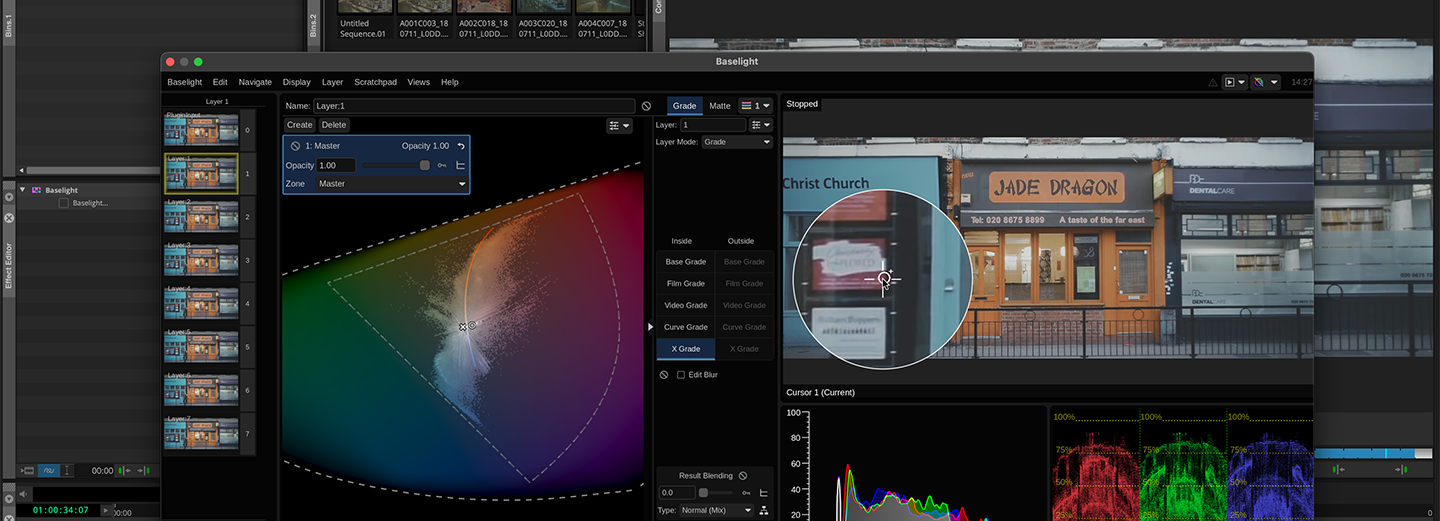
Baselight Editions extends the capabilities of a high-end colour grading system directly onto the Avid timeline in a powerful, flexible, and tightly integrated workflow. This AVX plugin features unlimited layers of colors, grading inside and outside mattes, variable feathering, point tracking and area tracking — all live and fluidly interactive on the Avid timeline, minimising and even eliminating the need to go back into the colour suite with last-minute changes.
If you're not already familiar with Baselight, you'll find the intuitive and friendly interface quick to learn and a pleasure to work with. Take a look at the Baselight Editions Overview for a description of the features common to all products in the Baselight Editions range.
Renderless Workflows for Ultimate Efficiency & Flexibility
Everything you do within Baselight for Avid – or a full Baselight system – is saved within the project and can be embedded in an AAF file and/or saved to the FilmLight BLG file format. The grade can be exported from a full Baselight suite and imported into Avid so you can apply a full, complex grade in a matter of seconds – without rendering. It includes all grading layers, tracking information and even keyframes so no manual adjustment is needed.
And the workflow is fully bidirectional – if the grade is changed in Avid it can be exchanged with a Baselight system or even another Avid suite just as easily, with all edits intact and without needing to conform.
Baselight for Avid allows you to view – or to render – grades passed between departments via BLG data encoded in AAF files – without purchase. It’s perfect for collaboration with colleagues or facilities that don’t have Baselight, or that don’t need complete creative control of the look.
The full licence for Baselight for Avid allows you to modify the grade if you need to – with the power of the Baselight core toolset and without leaving Avid.
Baselight Grade File (BLG) support
The BLG file is a small and portable data file that enables looks to be exchanged in a streamlined workflow with all FilmLight systems including Baselight and Daylight. When we use the term ‘look’, we’re not just talking about a LUT or a restricted grade – the look within the BLG is the full creative intent with all the individual grading layers.

Annual Subscription allows you to purchase a subscription licence – either node-locked or floating.
30-Day Trial gives you access to a fully functioning, node-locked product for 30 days.
Free Licence allows Baselight Editions to be used for free, so you can pass grades to other facilities where they can be accurately read and rendered – without purchasing a licence.
See the Store FAQs for more information on all of these options.
Baselight Editions is also available at special pricing for academic institutions.
Support
If you need to download the Baselight Editions installer again, or you are looking for the latest version, you can find it on the Baselight Editions Downloads page.
If you have a specific question, email it to [email protected].
Link to Full Baselight Grades with BLG Link
With less time and increased demands, it’s easy for the grading process to feel squeezed. But BLG Link gives you back that time without compromising results.
BLG Link sits in an Avid effect layer above the sequence. Just point it at a directory of BLG files and Baselight for Avid will apply the right grade to each clip automatically. You can even point it at a Baselight scene, and any grade changes on the full Baselight system will be updated immediately.Not only that, but you can adjust the look in Avid and save it back to the grade directory so that all edit stations – and the colour suite – are working from the latest version all the time. BLG Link is real-time, too.

To find out more about renderless worklows with Baselight for Avid – either via AAF or using BLG files and the Baselight Lens – watch this video.
GPU Rendering
Baselight utilises the system GPU, if available, to accelerate rendering performance. Baselight for Avid is a real-time plugin, so most colour corrections can be played directly on the Avid timeline.
Real-time Client Monitoring
The input cache means that client monitoring is significantly faster so that even when the Baselight user interface is open above the Avid sequence, Baselight for Avid provides client monitoring in real-time.
Temporal Operations
To help you to get the most out of your images, Baselight for Avid supports temporal operations like Denoise to remove random image noise and Deflicker, which extracts even the most complex or irregular inter-frame flicker.
Streamlined Access to Shots and Metadata
Baselight for Avid provides play controls and a mini timeline, called the Shot Bar. This gives you a visualisation of all the Baselight effects within the current Avid track, which you can click and drag to quickly move to other shots – without closing the Baselight for Avid window.
This panel also gives you quick access to view and change the copy/paste apply options and the navigation filter. Plus the Metadata View shows all the obtainable metadata for the current frame for fast review.

Subdivide and Conquer
Grading is faster with Baselight for Avid’s subdivide options.
This feature is useful if you want to use a single Baselight effect to apply an overall grade to a series of shots quickly and then, when you are happy with the basic grade, subdivide it so that it can be adjusted for individual clips.
Automated Tracking
Baselight’s automatic tracking system provides several options to track objects through a shot: one-point, two-point, or the area tracker. The incredibly accurate and fast area-based tracker allows you to define an area in the image (rather than individual points) and Baselight will track the translation, rotation and scale of the object precisely.
Baselight for NUKE
Now available for Windows, Linux and Mac.

Baselight Editions v6 is now available
The innovative Baselight v6 colour tools have been extended across the entire FilmLight product range – from Baselight to Baselight Editions and Daylight.
Bring the powerful Baselight grading toolset directly into the VFX pipeline.
Baselight for NUKE enables you to add high quality, complex colour correction to your shots quickly using a comprehensive set of the powerful grading tools and other features available on full Baselight systems.
Baselight for NUKE shares the same grading functionality as all other products in the Baselight Editions range – check out the Baselight Editions overview for more information about common features.
Maximum Flexibility, Maximum Efficiency
When you’re reviewing VFX dailies with your clients or your team, you don’t have to wait to get graded shots back from the colour suite, or waste time applying a ‘simple’ grade that doesn’t accurately preview the final look. Baselight for NUKE gives you real-world, complex grades right within NUKE, including spatial operations such as shapes, Denoise and Add Grain, and keyframes for grades that change over time.
By seeing the full grade in context, you can spend time optimising the important factors for a shot and ignore those elements that the final grade would make unnecessary.
This simple, effective workflow is based around the Baselight Grade file (BLG).
Rendering support for Baselight features
Baselight Editions provide a comprehensive subset of features enabling complex looks to be achieved within your VFX suite. However, advanced rendering support for almost all Baselight features is provided within Baselight for NUKE—allowing final delivery of jobs (which may have been graded in a full Baselight system) directly from NUKE.

Annual Subscription allows you to purchase a subscription licence – either node-locked or floating.
30-Day Trial gives you access to a fully functioning, node-locked product for 30 days.
Free Licence allows Baselight Editions to be used for free, so you can pass grades to other facilities where they can be accurately read and rendered – without purchasing a licence.
See the Store FAQs for more information on all of these options.
Baselight Editions is also available at special pricing for academic institutions.
Support
If you need to download the Baselight Editions installer again, or you are looking for the latest version, you can find it on the Baselight Editions Downloads page.
If you have a specific question, email it to [email protected].
Baselight Grade File (BLG) support
Baselight for NUKE, like all the other products in the Baselight range, supports the FilmLight BLG file format. The BLG is a multi-track OpenEXR file that you can use to create, transfer and review looks. When we use the term ‘look’, we’re not just talking about a LUT or a restricted grade—the look within the BLG is the full creative intent.
The small and portable BLG data file enables looks to be exchanged with Baselight as well as Daylight. The workflow is completely bi-directional so grades can be created externally and brought into Baselight for NUKE or taken from NUKE back to the colour suite.
And as the BLG grade can be quickly imported or exported directly from the properties panel of the Baselight node, there is no requirement to access the rich grading user interface unless you have a specific need to do so.

Interchange between Baselight for NUKE and a full Baselight system

Handle Multiple Inputs with Ease
Baselight can act as a multi-input node in NUKE so that BLG files can refer to multiple input images and OpenEXR channels.
This allows any composites done in full Baselight to be replicated exactly in NUKE. When you load a BLG that requires multiple inputs, additional input stalks appear automatically on the node, so you can link in the additional inputs quickly.
Formats
The BLG filestores format and mapping information, so even if the full Baselight grade uses material from multiple sources, Baselight for NUKE will combine the elements using exactly the same grades and transforms.
NUKE Script Generation
Baselight supports functionality for generating NUKE scripts alongside BLG grade files for EXR input material; the scripts can then be loaded in NUKE so that the multiple inputs and the BLG grade are all located and connected automatically, using the correct format mappings and colour spaces.
