




Daylight v7 now available
A powerful platform for dailies management and high-performance transcoding
Daylight is designed to handle the end-to-end requirements of your dailies workflow, from ingest and review, through audio syncing to the generation of material for editorial, VFX and other deliverables.
Daylight is available on macOS or Linux.
Daylight v7 is now available.
Designed to handle the end-to-end requirements of your dailies workflow, Daylight v7 subscriptions are available for any length so you never pay for more than you really need. In our latest release, you can create and edit Chromogen looks, and with the FilmLight API, Daylight can be embedded into your existing workflow.
See the latest Daylight datasheet for more information, or contact your local Sales Representative or [email protected].
Use the links below to buy or try Daylight.

14-Day Trial gives you access to a fully functioning version of Daylight for 14 days.
Custom Duration allows you to access a full licence for the exact number of days required, with a limit of 365 days.
3-Month Subscription allows you to access a full licence for Daylight for three (3) months.
Annual Subscription allows you to access a full licence for Daylight for one (1) year.
Support
If you need to download the Daylight installer again, or you are looking for the latest version, you can find it on the Daylight Support page.
If you have a specific question, email it to [email protected].
Grade via CDL/AMF or with full Baselight creativity
Daylight supports cross-platform colour workflows, allowing grades to be constrained to CDL values or exported as 3D LUTs, AMF metadata, or BLG files. This flexibility ensures compatibility with all grading systems.
If a Filmlight workflow is selected, grade data can be transferred to Baselight Editions for Nuke or Avid. In addition, creative looks can be created directly within Chromogen and applied quickly within the workflow.
Never pay for more than you really need
Daylight v7 subscriptions are available for any length of time. Sign up for quarterly or annual subscriptions, or use the Custom Duration option to purchase the number of days you need for your current project, all directly from our web store.
Deploy with ease
The Mac software will run on any system equipped with macOS 15, 15 or 26. Using the same philosophy as Baselight Editions, Daylight uses whatever graphics card is installed without the need for special, CUDA-capable variants.
As your throughput requirements increase you can upgrade to the Linux version of Daylight (which runs on customer-supplied hardware and supports multiple Nvidia GPUs).
Extensive metadata support
Daylight provides comprehensive end-to-end metadata management. The system automatically extracts metadata from camera and audio file headers, and displays the relevant information in Flux Manage and the Shots View. Metadata can also be displayed on thumbnails in the Scene and Galleries.
The Gallery handles metadata the same way. Combine metadata fields into complex queries and save them as filters, or perform a quick text search on-the-fly.
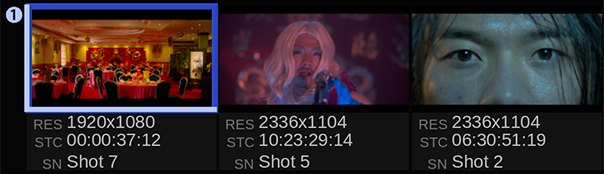
New in Daylight v7: Fully editable Chromogen looks
The Chromogen look development tool has been produced by FilmLight’s image engineers alongside the world’s foremost colour creatives, and is designed from the ground up to produce scene-referred looks.
Now users can edit Chromogen looks directly in Daylight, and save finished looks as presets for easy access, or export them as LUTs for on-set previsualisation.
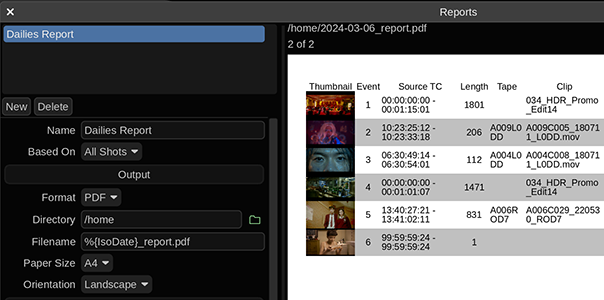
Custom reporting
Daylight’s extensive metadata handling carries on over into a fully-featured report generator that includes custom columns, colour accurate thumbnails and cover pages. This means that you can produce a consistent, professional report at the end of every workday.
Transcoding in post
Daylight is developed from the same code as Baselight – so it supports all common RAW camera formats and delivery codecs natively as soon as they are released. This means it includes the same audio and retiming capabilities found in Baselight too.
Sophisticated rescaling, filtering, masking and burnin operations, alongside Truelight Colour Spaces for accurate colour transforms, mean that all of your deliverable requirements are met by one application.
Comprehensive support for cameras & deliverables
As well as native format support, Daylight provides for user-defined formats and a sophisticated format mapping system that allows resolution, aspect ratio, frame rate and colour space to be freely mixed within a project.
And because the application runs on both Mac and Linux platforms, the most common requirements become simple tasks, like mounting exFAT data packs and attaching Thunderbolt drives.
Audio sync & playback
Audio can easily be synced with your camera footage — either using timecode in a fully automated process, or semi-automatically with a clap-detector, which pinpoints the exact time in the audio that the clapper closes.
Sound files that span multiple camera takes are easily handled and waveforms help you to manually adjust sound sync on a per-shot basis.
ACES AMF workflows
The ACES Metadata File (AMF), which is an XML-based sidecar file, is widely being adopted as a standardised ‘recipe’ for colour intent across the industry.
AMF export is available from the Shots View or via FLAPI in automated workflows, ensuring input colour spaces are correctly tagged with CDL grades, and incorporating ACES Reference Gamut Compression and LUTs in ACES Common LUT Format (CLF). Daylight-specific operators, such as Chromogen, are rendered to a CLF LUT referenced within the AMF.
The fastest renderer never runs
Working with Baselight or Baselight Editions in post?
The Render Queue is useful when delivering graded files; however, the fastest workflow avoids rendering images and instead delivers grading metadata.
If you are working in a facility with Baselight or Baselight Editions, the full grade from Daylight can be exported in a completely portable, cross-platform ‘BLG’ file. This file contains the grade without having to deliver new media.
Heard about the BLG file (Baselight Grade file)?
It’s a multi-track OpenEXR file format that you can use to create, transfer and review looks.
When we use the term ‘look’, we’re not just talking about a LUT or a restricted grade – the look within the BLG is the full creative intent. It includes all grade information: grading layers, colour space transforms, conform metadata , as well as blurs, filters and grain for dynamic effects.
It interoperates fully with Baselight, Daylight and even Baselight Editions within Avid, NUKE and Flame, but you can use it as a review format without any FilmLight hardware or software.
Professional panel support
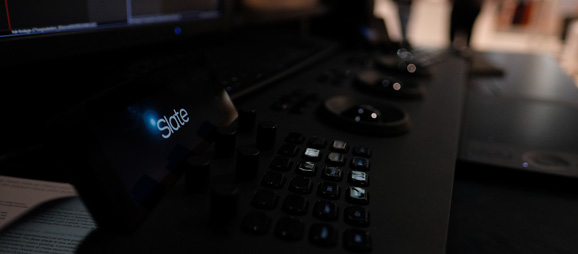
Daylight supports for Tangent Wave and Element panels, as well as Avid Artist Color and Transport devices. However, just because you’re grading dailies, it doesn’t mean you can’t have a purpose-designed control surface. Our Slate panel is an ideal size for the near-set environment.
The Chalk application for Slate also lets you customise the buttons on the control surface to realise the high productivity required in an effective dailies process.
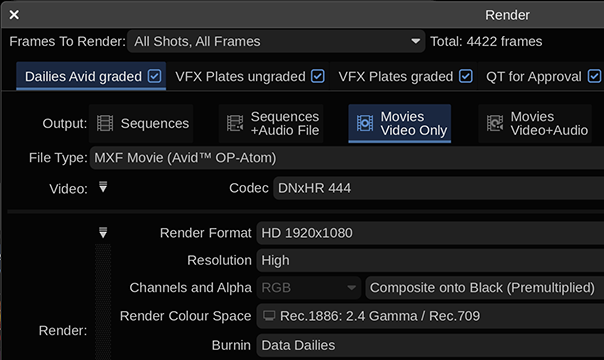
Render Queue with multiple deliverables
No need to wait for Daylight to finish rendering before you start the next operation. You can pause, re-order and resubmit tasks to the Render Queue enabling you to work efficiently.
When working on dailies — where you want to queue up multiple renders from a day’s shoot — you can optimise the rendering process even further by simultaneously producing multiple deliverables from the same master footage; for example, producing QuickTime movies at the same time as rendered EXR files.
